
1. The right address
Use the job’s service location, not an assumption that every customer has a single address. Keep access instructions with the visit.
CREW DISPATCH SOFTWARE
Dispatch is more than filling calendar squares. Keep the job, time and assigned crew together, then give the field team the details they need to work.
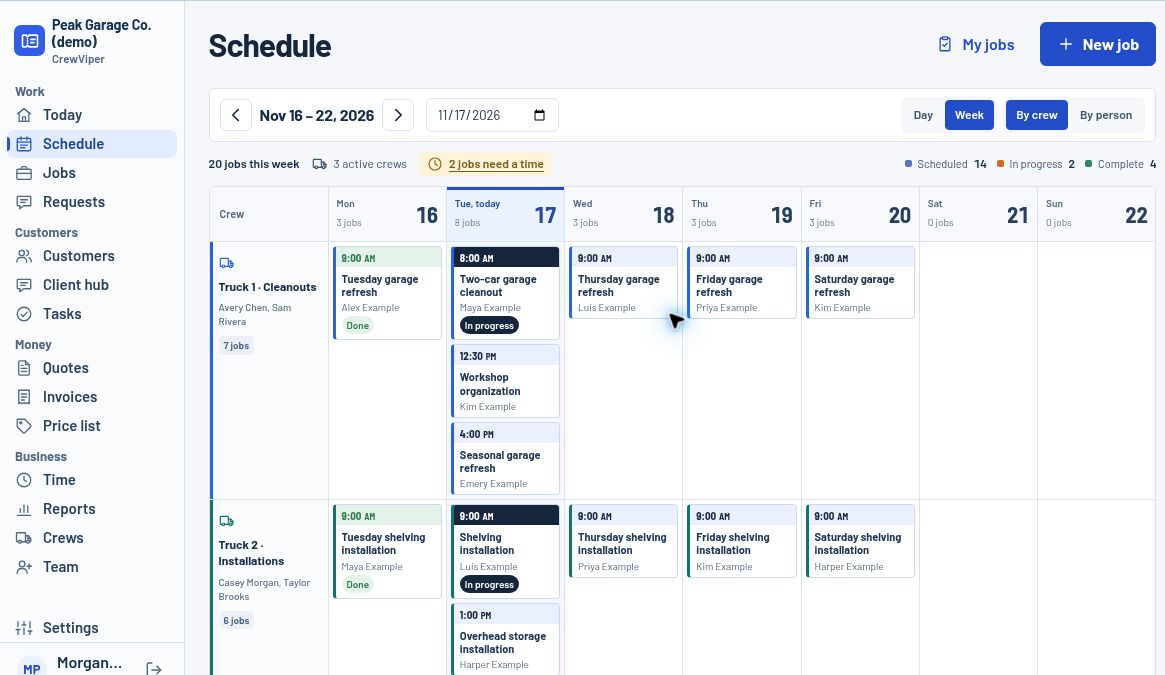
The CrewViper demo opens a real dispatch interface populated with a fictional business. Explore day and week scheduling, crew assignments and unscheduled work. You can inspect the same sample job from the office and crew viewpoints.
Use the job’s service location, not an assumption that every customer has a single address. Keep access instructions with the visit.
A requested date is not a confirmed appointment. Check start, end and timezone before putting the job on a crew’s plan.
Assign the crew or people doing the work. An attractive calendar is not enough if nobody knows the job belongs to them.
Put instructions where the assigned crew can find them. Keep pricing and office-only information in the appropriate staff view.
Distinguish scheduled, in progress and completed work. Completion should leave a usable record for whoever handles the office follow-through.
Reloading resets the demo. It will not notify a customer, change a real appointment or charge a card.
A good dispatch board makes assignments and timing visible. It does not by itself calculate the best driving route, track live vehicles or guarantee that a schedule is efficient. Those are separate capabilities to evaluate. CrewViper’s current demo should be judged on the scheduling and crew workflows it actually exposes, not future routing promises.
Crew access is separated from office financial screens. In the demo, switching to the crew role shows assigned work rather than quote and invoice pricing.
No. Demo changes only affect the fictional workspace and reset on reload. No customer messages are sent.
The application includes a mobile crew workspace as well as office screens. Try the tasks your team performs on an actual phone before adopting it.
Start by requesting pilot access and validating your own workflow. Run a controlled parallel job before moving your live schedule.
Private pilot. Production accounts are invite-only. The public demo uses fictional data, resets on reload and cannot send customer messages or take payments.